

MCP Is the New Standard for AI Integration. But Most Teams Don’t Know How to Build It Properly
Model Context Protocol (MCP) is transforming how SaaS products integrate with AI. It gives language models structured, validated, permission-controlled access to tools, data, and internal services safely.
But here’s the truth:
Building a production-ready MCP server is not the same as building a simple requires architecture design, schema planning, tool strategy, safe execution, validation layers, and an understanding of LLM behavior.
This article provides a hands-on, engineering-level guide for CTOs, architects, and senior developers who want to build an MCP server from scratch. We’ll cover:
- How MCP works internally
- Architectural layers & patterns
- Schema design & validation
- Tool structure & execution
- Error handling
- Messaging strategies
- Infrastructure & deployment
- Real code examples
- What to avoid
And importantly:
Invatechs has built production-ready MCP servers for SaaS companies and AI-driven startups. If you want a reliable implementation, we’ve got you covered.
Let’s dive in.
How MCP Works at a Low Level
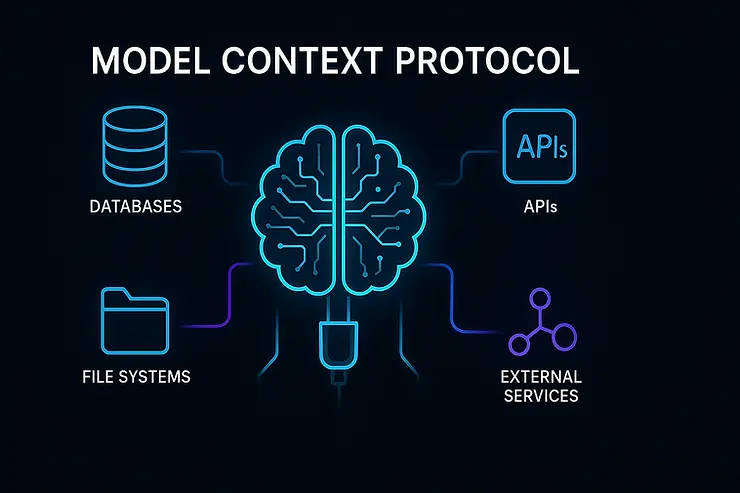
Before building anything, engineers must understand MCP’s core design principles:
1. Tools
Functions exposed to the LLM with strict input/output schemas.
2. Resources
Long-lived objects (documents, data structures, knowledge sources) the LLM can access.
3. Prompts
Context templates the AI can reference.
4. Bidirectional communication
The LLM can request tool execution; your MCP server returns structured responses.
5. Safety model
MCP enforces controlled capabilities. No random actions.
MCP Server Architecture (Invatechs Standard Blueprint)
A professional MCP server requires 6 layers:
Layer 1 — API & Transport Layer
Handles:
- Streaming
- Request routing
- Message formatting
- Authentication
Most servers use:
- Node.js
- Python
- Go
Invatechs recommends TypeScript for predictable schemas.
Layer 2 — Schema Definition Layer
This is where developers define:
- tool input schema
- output schema
- error schema
Using Zod or JSON Schema.
Example (TypeScript + Zod):
import { z } from "zod";

export const CreateTicketInput = z.object({
  customerId: z.string(),
  description: z.string(),
  priority: z.enum(["low", "medium", "high"])
});

export const CreateTicketOutput = z.object({
  ticketId: z.string(),
  status: z.string(),
});
Schemas prevent LLM hallucinations by validating requests.
Layer 3 — Tool Execution Engine
Each tool must have:
- pure business logic
- external dependency injection
- safe execution
- timeouts
- error boundaries
Tool Example:
export const createTicket = async (input, context) => {
  const { customerId, description, priority } = input;

  const ticket = await context.crm.createTicket({
    customerId,
    description,
    priority,
  });

  return {
    ticketId: ticket.id,
    status: "created"
  };
};
Invatechs Tip:
Always separate “business logic” from “MCP tool wrapper” to prevent coupling.
Layer 4 — Business Logic Layer
This includes:
- core services
- domain logic
- rulesets
- DB queries
- microservice orchestration
Invatechs uses clean architecture, enforcing clear boundaries:
/domain
/usecases
/integrations
/mcp-tools
Layer 5 — Integration Layer
Connects your MCP server to:
- databases
- CRMs
- billing systems
- internal APIs
- cloud services
Design patterns used:
- Repository
- Gateway
- Adapter pattern
Layer 6 — Security & Observability Layer
Includes:
- audit logs
- request validation
- access control
- rate limiting
- error logs
- tracing
- monitoring
Invatechs strongly recommends implementing multi-level guardrails.
MCP Tool Design Patterns
When building MCP tools, use predictable patterns.
Pattern 1 — Simple Action Tools
Great for CRUD:
- createRecord
- updateCustomer
- triggerEmail
Pattern 2 — Workflow Tools (Invatechs Recommended)
Combines multiple actions:
export const onboardCustomer = async (input, ctx) => {
  const profile = await ctx.db.createProfile(input);
  await ctx.email.sendWelcome(profile.email);
  await ctx.crm.createRecord(profile);
  return { message: "Onboarding complete" };
};
Pattern 3 — Data Retrieval Tools
Good for analytics:
export const getRevenueReport = async (input, ctx) => {
  return await ctx.analytics.generateRevenue(input.period);
};
Pattern 4 — Orchestration Tools
These are powerful: LLM triggers a sequence of events.
Pattern 5 — Validation-first Tools
Always validate early.
MCP Server Example (Minimal Implementation)
Below is a simplified MCP server structure using TypeScript.
import { Server } from "mcp-framework";
import { createTicket } from "./tools/createTicket";
import { CreateTicketInput, CreateTicketOutput } from "./schemas";

const server = new Server({
  tools: [
    {
      name: "create_ticket",
      inputSchema: CreateTicketInput,
      outputSchema: CreateTicketOutput,
      execute: createTicket
    }
  ],
  context: {
    crm: new CRMClient(),
    email: new EmailService()
  }
});

server.start(3000);
A production version requires:
- error middleware
- auth layer
- context augmentation
- structured logs
- request tracing
- environment configs
Invatechs implements all of this.
Error Handling & Safety
LLMs make mistakes. Your server must detect and correct them.
Add error envelopes:
throw new MCPError("INVALID_INPUT", "Customer not found");
Validate output as well
Yes — validate both directions.
Log every tool call
Audit logs are mandatory.
Connecting MCP to LLM Agents
There are three typical ways:
1. Direct LLM Integration (OpenAI / Anthropic)
Useful for SaaS applications.
2. AI Agent Frameworks
Examples:
- LangChain
- CrewAI
- Autogen
- Semantic Kernel
3. Custom Agent Layer (Invatechs Recommended)
Gives full control.
Deployment Strategies (The Invatechs Way)
MCP servers run best with:
1. Docker containers
Predictable environments.
2. Kubernetes or ECS
Scalable orchestration.
3. Load balancers (Nginx / ALB)
Handles agent concurrency.
4. Monitoring stack
- Grafana
- Prometheus
- DataDog
5. Automated CI/CD
GitHub actions + IaC (Terraform).
6. Secrets management
Vault or AWS Secrets Manager.
Invatechs provides a full production set-up.
Real-world Example Architecture
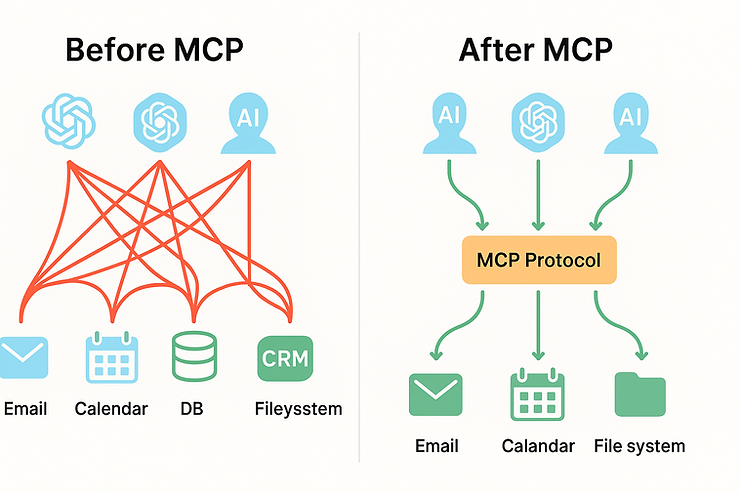
Imagine a SaaS CRM wants MCP access. Architecture:
AI Agent
   ↓
MCP Server
   ↓
Business Logic Layer
   ↓
CRM Database / Stripe / Email / Admin panel
The LLM can now:
- create contacts
- generate reports
- run onboarding
- update subscriptions
- produce insights
Should Your SaaS Company Build an MCP Server? Checklist
If you answer “yes” to 3 or more — MCP is a perfect fit:
- Do you have repetitive workflows?
- Do employees handle tasks manually?
- Do customers expect AI features?
- Do you want to automate CRM/Billing/Admin actions?
- Do you want AI agents to perform real work?
- Do you have multiple internal systems?
- Do you want to improve engineering velocity?
If so:
Invatechs can architect, build, integrate, secure, and deploy your MCP server end to end.
Building MCP Servers Requires Real Engineering Expertise
MCP is not a plug-and-play feature. It’s a deep architectural component that requires:
- backend engineering
- AI agent experience
- schema design
- security modeling
- validation rules
- workflow orchestration
- integration engineering
- DevOps deployment
Most teams underestimate the complexity.
Invatechs helps SaaS companies and startups build MCP servers that are:
- production-ready
- secure
- scalable
- cleanly architected
- deeply integrated with your business tools
- optimised for real AI agents
If you need an MCP partner, we’ve got you covered.